


Self-Printing/Copying/Scanning
The library provides 4 self-service multifunctional machines for printing, copying, and scanning. Two machines are located at the Main Campus Library (on the south side of the first-floor electronic reading area), and two machines are at the Shunde Campus Library (on both sides of the stairs in the second-floor electronic reading area). Currently, all four multifunction devices are black-and-white only, offering black-and-white printing, black-and-white copying, and color scanning. All users holding a valid campus card may use these services. Printing and copying are fee-based services, with charges deducted directly from the campus card balance. Scanning is free of charge. Printing can be done from any computer on campus that has the self-service printing client, and payment can be made easily at any machine equipped with the card-swiping system. The printed documents can then be collected. The specific pricing standards and usage instructions are as follows:
1. Fee Standards
|
Paper Type |
Pages |
Printing |
Copying |
Scanning |
|
A4 |
Single-Sided |
0.1 yuan/page |
0.1 yuan/page |
Temporarily free |
|
Double-Sided |
0.2 yuan/page |
0.2 yuan/page |
||
|
A3 |
Single-Sided |
0.2 yuan/page |
0.2 yuan/page |
|
|
Double-Sided |
0.4 yuan/page |
0.4 yuan/page |
2. Operating Procedure
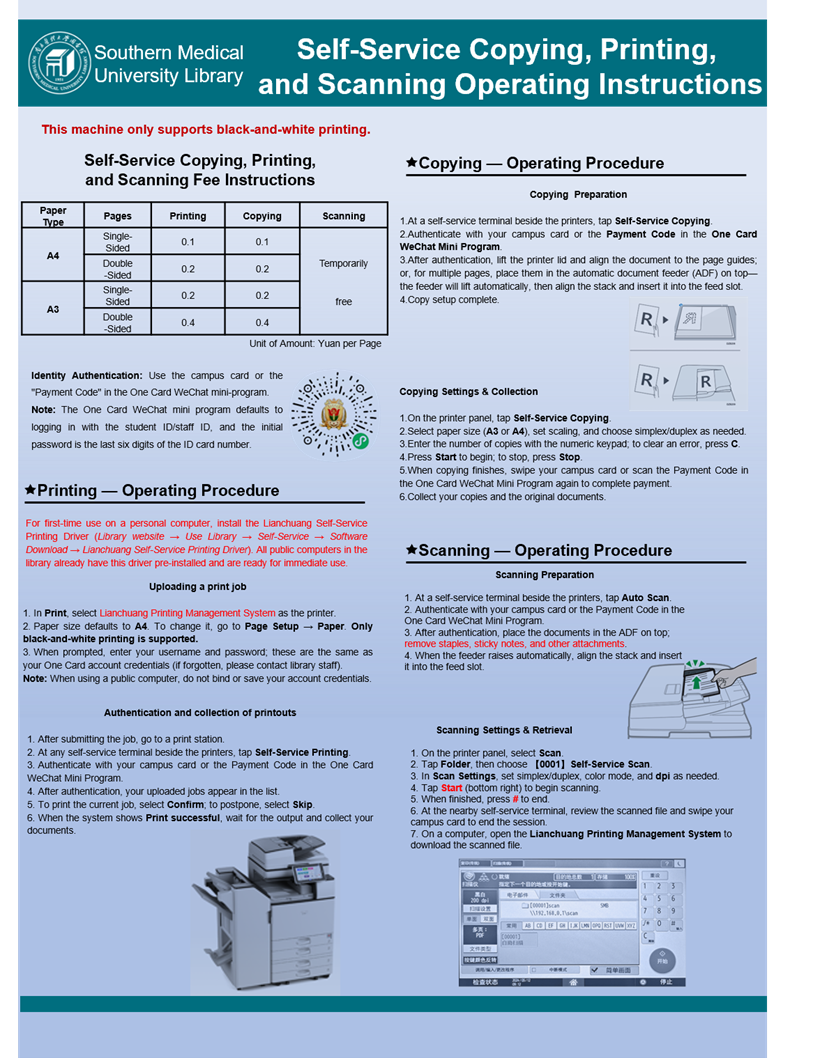
3. Self-Service Printing Driver
Library Homepage → Use Library → Self-Service → Software Download
Note: If the printed document appears garbled, it may be due to the operating system installed on the computer (a Ghost version) which lacks the standard font library.
Solution 1: Use another computer, such as one in the electronic reading area, to print.
Solution 2: Install the full font library on the computer.